0 ratings

Numéro d'article:
244510634
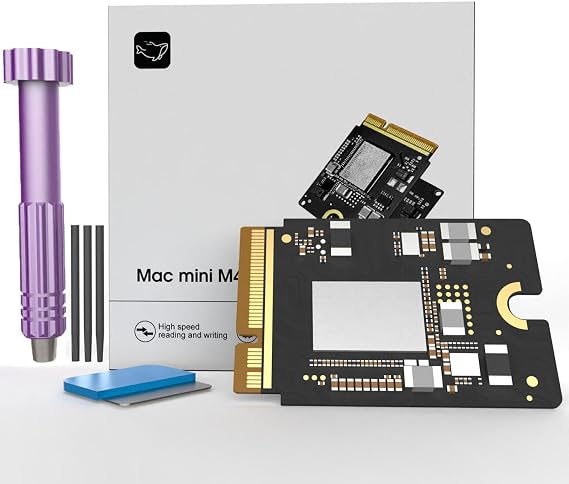
Mac mini M4 SSD 1TB, Hard Disk Storage Upgrade for Mac mini M4 | Upgrade your storage to securely store all your files with confidence.
Numéro d'article:
244510634
XOF 222379
Détails du prix
Hors frais de livraison et de douane ( Les frais de livraison et de douane seront calculés lors du paiement )
*Tous les articles seront importés depuis États-Unis
0 ratings
Écrire un commentaire
En stock
 Importé depuis la boutique USA
QTY:
Commandez maintenant et recevez votre commande aux alentours du Sunday, Août 30
Transaction sécurisée
Ubuy s'engage à protéger votre sécurité et votre confidentialité. Notre système avancé de sécurité des paiements garantit la confidentialité en chiffrant vos informations lors de la transmission grâce aux protocoles AES (Advanced Encryption Standards) et SSL (Secure Socket Layer). Vos coordonnées de paiement sont 100 % sécurisées car nous ne partageons pas vos informations de paiement avec des vendeurs tiers.
Nos meilleurs partenaires logistiques


Expand your Mac mini M4 storage with our 1TB SSD, boasting read/write speeds of up to 3300 MB/s for lightning-fast performance!

Livraison
rapide

Retour
gratuit*

Emballage sécurisé

Produits 100 % originaux

Conformité PCI DSS

Certifié ISO 27001



Note: Step Down Voltage Transformer required for using electronics products of États-Unis store (110-120). Recommended power converters Acheter maintenant.


Détails du produit
| Digital Storage Capacity | 1 TB |
| Hard Disk Interface | eSATA |
| Connectivity Technology | Thunderbolt |
| Additional Features | Data Recovery Service |
| Hard Disk Form Factor | 2.5 inches (6.4 cm) |
| Compatible Devices | Macmini M4 |
| Specific Uses For Product | Personal |
| Read Speed | 3300 megabytes_per_second |
| Media Speed | 3300 megabytes_per_second |
| Data Transfer Rate | 3300 megabits_per_second |
| Form Factor | 2.5-inch (6.4 cm) |
| Hardware Connectivity | Thunderbolt |
| Installation Type | Internal Hard Drive |
| Enclosure Material | Nand Flash |
| Brand | Zinweyton |
| Model Number | AD-AU |
| Hard Disk Description | Solid State Drive |
| Built-In Media | 1 |
| Model Name | AD-AU |
| Manufacturer | Zinweyton |
| Hard-Drive Size | 1 TB |
| Number of Items | 1 |
| Unit Count | 1 Count |
| Customer Package Type | Standard Packaging |
| Special Feature | Data Recovery Service |
| Hard Disk Size | 1 TB |
| Item Weight | 0.5 lbs (230 grams) |
DESCRIPTION DU PRODUIT
Mac mini M4 SSD 1TB, Hard Disk Storage Upgrade for Mac mini M4 | Upgrade your storage to securely store all your files with confidence.
Vous avez une question ? Chattez avec nous
Questions et réponses des clients
-
question:
What are the benefits of upgrading to a 1TB SSD for my Mac mini?
répondre: Upgrading to a 1TB SSD significantly enhances your Mac mini's performance. The increased storage capacity allows you to store more applications, files, and media without worrying about running out of space. Additionally, SSDs provide faster read and write speeds compared to traditional hard drives, resulting in quicker boot times, application launches, and file transfers. This upgrade is particularly beneficial for users working with large files or demanding applications, such as video editing software or graphic design programs. -
question:
Is the M4 Macmini 1TB SSD compatible with my Mac mini model?
répondre: The M4 Macmini 1TB SSD is designed for specific Mac mini models. Before making a purchase, it’s crucial to verify compatibility with your Mac mini version. You can typically find compatibility information in the product specifications or by checking Apple’s official documentation. Ensuring that the SSD matches your system's model will guarantee optimal performance and reliability post-installation, allowing you to take full advantage of the storage upgrade. -
question:
Can I install the 1TB SSD myself, or will I need professional help?
répondre: Yes, the M4 Macmini 1TB SSD is designed for DIY installation, making it accessible for users with basic technical skills. The process typically involves opening the Mac mini case, replacing the current hard drive with the SSD, and securely reassembling the unit. Installation guides and video tutorials are often available online to assist you through each step. However, if you're uncomfortable performing the upgrade yourself, seeking help from a professional technician is always an option. -
question:
What tools do I need to install the M4 Macmini 1TB SSD?
répondre: To install the M4 Macmini 1TB SSD, you'll need a few basic tools. Typically, a Torx screwdriver set and a spudger tool are essential for opening the Mac mini and safely removing the existing hard drive. Additionally, you may require an ESD strap to prevent static damage to internal components. Preparing these tools before starting the installation process will help ensure a smooth and safe upgrade experience, allowing you to focus on the task at hand. -
question:
Will upgrading to a 1TB SSD improve gaming performance on my Mac mini?
répondre: Absolutely, upgrading to a 1TB SSD can enhance gaming performance on your Mac mini. SSDs provide faster data access, which translates to quicker load times for games and smoother gameplay. This enhancement is particularly evident in titles requiring substantial assets or textures. Players should notice an overall improvement in the gaming experience, enabling more fluid transitions and less lag during gameplay. -
question:
What precautions should I take before installing the M4 Macmini SSD?
répondre: Before installing the M4 Macmini SSD, it’s essential to back up all important data to avoid data loss. Additionally, you should ensure your workspace is well-lit and free from static electricity to protect your Mac mini’s internal components. Take your time to understand the installation process through manuals or guides, and prepare all necessary tools beforehand. Following these precautions will promote a successful upgrade and help maintain the integrity of your device. -
question:
Can I use the M4 Macmini 1TB SSD for booting macOS?
répondre: Yes, the M4 Macmini 1TB SSD is suitable for booting macOS. In fact, installing macOS on an SSD can lead to notable improvements in system responsiveness and performance. After installation, you can easily configure the new SSD as your startup disk through system preferences. This setup allows for faster boot times, allowing you to start working more quickly and efficiently. -
question:
What is the expected lifespan of an SSD compared to a traditional hard drive?
répondre: SSDs, including the M4 Macmini 1TB SSD, generally offer a longer lifespan than traditional hard drives. With no moving parts, SSDs are less prone to mechanical failure, making them more durable. While the actual lifespan varies based on usage, typically, SSDs can last many years while providing consistent speed and performance. This longevity makes them an excellent investment for users seeking reliable storage solutions. -
question:
What format should I use to initialize my new SSD after installation?
répondre: After installing the M4 Macmini 1TB SSD, it is recommended to initialize it in the APFS format. This file system is optimized for SSDs and provides improved efficiency for macOS. To format the drive, you can use the Disk Utility application available in macOS. Choosing the right format ensures your SSD operates smoothly and takes full advantage of its performance capabilities, helping you achieve optimal results. -
question:
Where can I buy the 2025 M4 Macmini 1TB SSD Storage Upgrade Internal Hard Disk for Mac mini in Benin?
répondre: You can purchase the 2025 M4 Macmini 1TB SSD Storage Upgrade Internal Hard Disk for Mac mini at Ubuy. They offer a wide range of products, including this SSD upgrade, ensuring convenience in your shopping experience. Ubuy is known for its reliable service and can help you find the right components for your Mac mini.
Zinweyton Internal Components AD-AU Editorial Review
Aucune critique éditoriale trouvée
Avis et évaluations clients
1 évaluations des clients
-
5 étoile
100%
-
4 étoile
0%
-
3 étoile
0%
-
2 étoile
0%
-
1 étoile
0%
Donnez votre avis sur ce produit
Partagez votre avis avec d'autres clients
CONFIANCE EN LA PLATEFORME & PROTECTION DE L'ACHETEUR

MA
Mohammad
Acheteur vérifié
“Excellent quality and original too,when ubuy send original things I will appreciate that ,I very satisfied thank you”
23 July 2026 · via Trustpilot
CK
Chitra
Acheteur vérifié
“The order and delivery progress was communicated very well. Package arrived within the estimated time. Products arrived as expected in good condition.”
22-Jul-26 · via Trustpilot
K
kund
Acheteur vérifié
“Good supply of products. Safe payment methods, and shipment worldwide! Genuine products.”
23-Jul-26 · via Trustpilot
OO
Onesi
Acheteur vérifié
“Was my first time buying a product from Ubuy, but I found it so helpful. This is reliable. Gonna place a new order!”
22 July 2026 · via Trustpilot
SJ
SAO JOHN
Acheteur vérifié
“Ubuy is a great online platform to buy stuff. Reliable, fast delivery time and great value for money. I've been using Ubuy online shopping platform for three years now and will continue to do so.”
23 July 2026 · via Trustpilot
Paiement sécurisé
Global Delivery
Retours faciles
Genuine Products
Historique des prix du produit
Informations importantes
- Limitations : Pour les produits expédiés à l'international, veuillez noter que toute garantie du fabricant peut ne pas être valide ; les options de service du fabricant peuvent ne pas être disponibles ; les manuels, instructions et avertissements de sécurité des produits peuvent ne pas être dans les langues du pays de destination ; les produits (et les matériaux qui les accompagnent) peuvent ne pas être conçus conformément aux normes, spécifications et exigences d'étiquetage du pays de destination ; et les produits peuvent ne pas être conformes à la tension et aux autres normes électriques du pays de destination (nécessitant l'utilisation d'un adaptateur ou d'un convertisseur le cas échéant). Il incombe au destinataire de s'assurer que le produit peut être importé légalement dans le pays de destination. En cas de commande auprès d'Ubuy ou de ses filiales, le destinataire est l'importateur officiel et doit se conformer à toutes les lois et réglementations du pays de destination.
- Tous les produits listés sur Ubuy ne sont pas à vendre, Ubuy étant un moteur de recherche mondial. Les produits sont soumis aux réglementations en matière d'exportation et de commerce.
XOF 222379
Commandez maintenant et recevez votre commande aux alentours du Sunday, Août 30
This item is not restrict in my country.(Please click on above link if this item is not restrict in your country, So our team will review and allow.)
QTY:
Transaction sécurisée
Conforme PCI DSS et certifié ISO 27001:2022, avec des paiements chiffrés et une protection complète de l'acheteur pour chaque commande.
Nos meilleurs partenaires logistiques
Livraison transfrontalière la plus rapide
Caractéristiques et avantages
- Perfect compatibility with Mac mini M4 for easy installation.
- Fully tested for reliability and consistent performance without speed drops.
- Offers 1TB capacity to store more photos, videos, documents, and apps.
- High-speed performance with read/write speeds of up to 3300 MB/s.
- Improves computer startup time and application launch speeds.
- Enhance your digital experience with efficient file transfer capabilities.
Assurance Ubuy
Profitez d'une expérience d'achat sereine avec des produits 100 % originaux, une sécurité de paiement conforme PCI DSS, une protection des données certifiée ISO 27001, la livraison transfrontalière la plus rapide, les retours gratuits* et un emballage sécurisé pour chaque commande.