- Page d'accueil /
- Produits de bureau /
- Électronique de bureau /
- Printers & Accessories /
- Computer Printers /
- Imprimantes à jet d'encre /
- Ink Tank Printers /
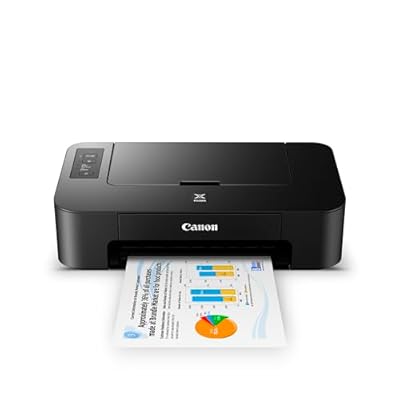
- Canon TS202 Inkjet Photo Printer, Black USB R...
0 ratings

Numéro d'article:
8375731
Canon TS202 Inkjet Photo Printer, Black USB Required, not Included
Numéro d'article:
8375731
XOF 143355
Price Details
Excluding Shipping & Custom charges ( Shipping and custom charges will be calculated on checkout )
*All items will import from États-Unis
0 ratings
Écrire un commentaire
En rupture de stock
 Importé depuis la boutique USA
Transaction sécurisée
Ubuy s'engage à protéger votre sécurité et votre confidentialité. Notre système avancé de sécurité des paiements garantit la confidentialité en chiffrant vos informations lors de la transmission grâce aux protocoles AES (Advanced Encryption Standards) et SSL (Secure Socket Layer). Vos coordonnées de paiement sont 100 % sécurisées car nous ne partageons pas vos informations de paiement avec des vendeurs tiers.
nos meilleurs partenaires logistiques


The Canon Pixma TS202 is a great, compact printing solution for all your documents.

Livraison
rapide

Retour
gratuit*

Emballage sécurisé

Produits 100 % originaux

Conformité PCI DSS

Certifié ISO 27001


Note: Step Down Voltage Transformer required for using electronics products of États-Unis store (110-120). Recommended power converters Acheter maintenant.


Ce qui se démarque
Compact Design
The Canon TS202 features a sleek, compact design that easily fits into small spaces, making it ideal for home offices or limited workspace without sacrificing performance.
High-Quality Prints
This printer delivers stunning photo quality with vibrant colors and sharp details, ensuring your cherished memories are preserved in impressively clear prints.
Affordable Printing
With its cost-effective ink system, the TS202 allows for affordable printing of documents and photos, making it a budget-friendly option for everyday use.
Détails du produit
- Fine hybrid ink system for detailed documents and photos
- Compact size fits almost anywhere
- Dedicated rear paper tray for quick paper refill
- Compatible with Windows and Mac operating systems
- Compatible with XL ink cartridges for cost-saving and extended usage
- Output tray capacity: 60 sheets of plain paper or 20 sheets of 4 x 6 / 10 sheets of 5 x 7 photo paper
| Package Weight | 13.73 Pound |
À qui est-ce destiné ?

-
Casual Photographers
Ideal for users wanting to print high-quality photos at home without advanced features or complex setups.
-
Student Use
Great for students needing affordable printing options for assignments and projects with decent quality.
-
Budget-Conscious Users
Attractive for those looking for an economical printer that offers value for basic photo printing needs.

-
Professional Photographers
Not suitable for professionals requiring advanced features, speed, or high-volume printing for their work.
-
Frequent Users
May not meet the demands of users with heavy printing needs due to slower printing speeds and ink consumption.
-
Wireless Connectivity Seekers
Unsuitable for users needing wireless printing options as this model requires USB connection for operation.
DESCRIPTION DU PRODUIT
Canon TS202 Inkjet Photo Printer, Black USB Required, not Included
Vous avez une question ? Chattez avec nous
Questions et réponses des clients
-
question:
What type of print quality can I expect from the Canon TS202 Inkjet Photo Printer?
répondre: The Canon TS202 Inkjet Photo Printer delivers exceptional print quality, producing sharp text and vibrant images. It uses a maximum print resolution of up to 4800 x 1200 dpi, allowing for detailed photos and graphics that excel in color accuracy. This makes it an ideal choice for printing photos, documents, and creative projects, ensuring your images are vibrant and professionally finished. Whether you're printing family photos or presentations, the quality is intended to meet the needs of both casual users and photography enthusiasts. -
question:
Is the Canon TS202 compatible with mobile printing applications?
répondre: Yes, the Canon TS202 supports mobile printing through various applications that allow for seamless connectivity. You can utilize features such as Canon's PRINT app and compatibility with Apple AirPrint for direct printing from your smartphone or tablet. This versatility empowers you to print on-the-go, making it convenient for busy individuals or families who want to quickly produce prints from their photographic adventures, social media, or important documents. -
question:
What types of paper can be used with the Canon TS202?
répondre: The Canon TS202 is designed to print on a wide variety of paper types, including plain paper, photo paper, and envelopes. It supports different sizes, such as 4"x6", 5"x7", letter, and various other media, allowing for a diverse range of projects. This flexibility makes it suitable for everything from printing everyday documents to creating high-quality photo prints for albums or framing, thus catering to various printing needs. -
question:
How do I connect the Canon TS202 Inkjet Photo Printer to my computer?
répondre: Connecting the Canon TS202 to your computer is straightforward, as it uses a USB connection. Simply plug the USB cable into the printer and your computer's USB port, then follow the on-screen instructions to install the necessary drivers. This direct connection method ensures a reliable communication channel for sending print jobs efficiently, perfect for users who need fast and direct access to their printing needs without relying on wireless networks. -
question:
Can I print photos directly from an SD card with the Canon TS202?
répondre: Unfortunately, the Canon TS202 does not have a built-in SD card slot. For printing images from an SD card, you would need to transfer the images to a computer or use a compatible mobile device. This means that while you won’t enjoy direct card printing, you’ll still have the flexibility to edit and organize your images before printing, which can enhance the final output’s quality. -
question:
What are the recommended ink cartridges for the Canon TS202?
répondre: The recommended ink cartridges for the Canon TS202 are the Canon PG-243 (black) and CL-244 (color) cartridges. These cartridges are specifically designed to work with this printer model, ensuring optimal performance and print quality. Using the recommended cartridges not only enhances text and photo precision but also streamlines your printing process for various projects, from office work to home printing. -
question:
How compact is the Canon TS202 Inkjet Photo Printer?
répondre: The Canon TS202 is designed to be compact and lightweight, making it an excellent choice for home or small office use where space is limited. Its small footprint allows for easy placement on desks, shelves, or in little nooks, offering flexibility in setup. This characteristic is especially beneficial for those who need an efficient printer without sacrificing valuable workspace. -
question:
Does the Canon TS202 support double-sided printing?
répondre: The Canon TS202 does not have an automatic duplex printing feature, but you can manually print on both sides of the paper. This can be done by printing the first side, flipping the pages, and then reloading them for the second side. Manually executing double-sided printing allows you to save paper and create more polished documents, making it ideal for situations where a professional presentation is required. -
question:
Where can I buy the Canon TS202 Inkjet Photo Printer?
répondre: You can buy the Canon TS202 Inkjet Photo Printer from Ubuy, a leading online retail platform that offers a wide selection of consumer electronics and printers. Ubuy provides detailed product descriptions, reviews, and specifications, allowing you to make an informed purchase decision. Their user-friendly interface makes it convenient to shop for this printer and other tech products from the comfort of your home in Benin. -
question:
Is the Canon TS202 Inkjet Photo Printer energy efficient?
répondre: Yes, the Canon TS202 is designed with energy efficiency in mind. It adheres to ENERGY STAR guidelines, which means it consumes less power compared to older printer models, helping you save on electricity while reducing your carbon footprint. This feature is particularly advantageous for users who frequently print or are environmentally conscious, ensuring that you can cater to your printing needs responsibly.
Canon Ink Tank Printers Editorial Review
The Canon PIXMA TS202 is a simple and easy to use printer. It comes with a complete set of full-size ink cartridges and uses Canon PG-245 and CL-246 ink cartridges. It can print on various paper sizes, including 3x5 cards and 110# cardstock. It requires both black and color ink tanks to be installed to print. It does not include a USB cable, but one is necessary to connect to a computer. Notably, it is not compatible with Google Cloud Print and does not have Bluetooth support. Overall, reviews are positive with users appreciating the printer's simplicity, lightweight, and the ability to print at a low cost. Users have reported no paper jams and no issues with printing in black ink if the color cartridges are empty. In contrast, one user reported the printer was not compatible with their computer, and another was disappointed that no USB cable was included.
Avis et évaluations clients
1 évaluations des clients
-
5 étoile
100%
-
4 étoile
0%
-
3 étoile
0%
-
2 étoile
0%
-
1 étoile
0%
Donnez votre avis sur ce produit
Partagez votre avis avec d'autres clients
Avantages
- Simple and easy to use
- Low cost printing
- Prints on various paper sizes
- Lightweight
Les inconvénients
- No USB cable included
Historique des prix du produit
Informations importantes
- Limitations : Pour les produits expédiés à l'international, veuillez noter que toute garantie du fabricant peut ne pas être valide ; les options de service du fabricant peuvent ne pas être disponibles ; les manuels, instructions et avertissements de sécurité des produits peuvent ne pas être dans les langues du pays de destination ; les produits (et les matériaux qui les accompagnent) peuvent ne pas être conçus conformément aux normes, spécifications et exigences d'étiquetage du pays de destination ; et les produits peuvent ne pas être conformes à la tension et aux autres normes électriques du pays de destination (nécessitant l'utilisation d'un adaptateur ou d'un convertisseur le cas échéant). Il incombe au destinataire de s'assurer que le produit peut être importé légalement dans le pays de destination. En cas de commande auprès d'Ubuy ou de ses filiales, le destinataire est l'importateur officiel et doit se conformer à toutes les lois et réglementations du pays de destination.
- Tous les produits listés sur Ubuy ne sont pas à vendre, Ubuy étant un moteur de recherche mondial. Les produits sont soumis aux réglementations en matière d'exportation et de commerce.
XOF 143355
Currently unavailable.
We don't know when or if this item will be back in stock.
This item is not restrict in my country.(Please click on above link if this item is not restrict in your country, So our team will review and allow.)
Transaction sécurisée
Ubuy s'engage à protéger votre sécurité et votre confidentialité. Notre système avancé de sécurité des paiements garantit la confidentialité en chiffrant vos informations lors de la transmission grâce aux protocoles AES (Advanced Encryption Standards) et SSL (Secure Socket Layer). Vos coordonnées de paiement sont 100 % sécurisées car nous ne partageons pas vos informations de paiement avec des vendeurs tiers.
nos meilleurs partenaires logistiques
Livraison transfrontalière la plus rapide
Caractéristiques et avantages
- Rear paper tray and fine hybrid ink system for detailed documents and photos.
- Compatible with XL ink cartridges.
- Can help save you money, print more when you need to, and extend the time between replacement.
- Quickly refill paper with the dedicated rear paper tray.
- Great compact size which fits almost anywhere.
- Output tray capacity - Rear paper tray 60 sheets of plain paper or 20 sheets of 4 x 6 / 10 sheets of 5 x 7 photo paper.