- Page d'accueil /
- Électronique /
- Computer Accessories /
- Networking Products /
- Print Servers /
- D-Link DP-311P Wireless Print Server, 1-Centr...
0 ratings



Numéro d'article:
7963864
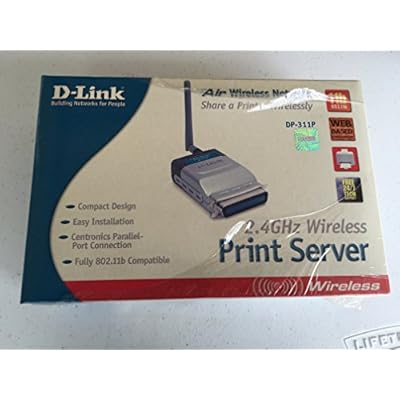
D-Link DP-311P Wireless Print Server, 1-Centronics Port, 802.11b, 11 Mbps
Numéro d'article:
7963864
XOF 142398
Price Details
Excluding Shipping & Custom charges ( Shipping and custom charges will be calculated on checkout )
*All items will import from États-Unis
0 ratings
Écrire un commentaire
En stock
 Importé depuis la boutique USA
QTY:
Seulement 1 article restant en stock.
Commandez maintenant et recevez votre commande aux alentours du Samedi, Juillet 04
Transaction sécurisée
Ubuy s'engage à protéger votre sécurité et votre confidentialité. Notre système avancé de sécurité des paiements garantit la confidentialité en chiffrant vos informations lors de la transmission grâce aux protocoles AES (Advanced Encryption Standards) et SSL (Secure Socket Layer). Vos coordonnées de paiement sont 100 % sécurisées car nous ne partageons pas vos informations de paiement avec des vendeurs tiers.
nos meilleurs partenaires logistiques


The D-Link DP-311P is the ideal network printing solution for small offices, home offices, schools and other businesses that require printer sharing.

Livraison
rapide

Retour
gratuit*

Emballage sécurisé

Produits 100 % originaux

Conformité PCI DSS

Certifié ISO 27001


Note: Step Down Voltage Transformer required for using electronics products of États-Unis store (110-120). Recommended power converters Acheter maintenant.


Ce qui se démarque
Wireless Connectivity
Enables users to print wirelessly from multiple devices without the hassle of cables, enhancing convenience and mobility in both home and office environments.
Fast Printing Speed
With a speed of 11 Mbps, it allows quick printer access, ensuring efficient print jobs for busy users seeking to optimize their workflow.
Multiple Device Support
Compatible with various printers and devices, allowing seamless integration into existing setups, making it an ideal solution for both small offices and home users.
Détails du produit
- Easy Web-Based set-up & Configuration
- Compact size for easy placement
- 802.11 standard compliant
- 1 parallel printer port to share a legacy printer on your network
| Product Dimensions (L x W x H) | 3.2 x 9.3 x 6 inches (8.1 x 23.6 x 15.2 cm) |
| Item Weight | 12 ounces (340.2 grams) |
| Item model number | DP-311P |
| Is Discontinued By Manufacturer | No |
| Date First Available | June 12, 2003 |
| Manufacturer | D-Link Systems, Inc. |
| Language | English |
À qui est-ce destiné ?

-
Home Office Users
Ideal for home office setups needing wireless printing from multiple computers without complicated setups.
-
Small Businesses
Great for small businesses requiring a cost-effective solution to share printers conveniently over a wireless network.
-
Legacy Device Users
Perfect for users with older printers, providing wireless functionality without expensive equipment upgrades.

-
High Volume Users
Not suitable for users with high printing demands, as it supports only basic 802.11b speeds.
-
Advanced Users
May disappoint tech-savvy users seeking advanced features like higher speeds or more connection options.
-
Large Networks
Limited by its 11 Mbps speed, making it unsuitable for large networks with multiple heavy print jobs.
DESCRIPTION DU PRODUIT
Vous avez une question ? Chattez avec nous
Questions et réponses des clients
-
question:
What is the D-Link DP-311P Wireless Print Server?
répondre: The D-Link DP-311P Wireless Print Server is a device designed to enable printing from multiple computers over a wireless network. It connects to a printer via a Centronics port and allows it to be accessed by various devices connected to a Wi-Fi network. This device is especially useful in offices or homes with multiple computers needing to print, eliminating the need for a direct USB connection to a single computer. -
question:
How does the DP-311P connect to my printer?
répondre: The DP-311P connects to your printer through a Centronics port, also known as a parallel port. This connection method is standard for many older printers. To set up your printer with the DP-311P, simply connect the printer's parallel cable to the server, configure the server via its web-based interface, and then integrate it into your wireless network for access from other computers or devices. -
question:
What wireless standards does the DP-311P support?
répondre: The D-Link DP-311P supports the 802.11b wireless standard, operating at speeds up to 11 Mbps. This allows it to communicate effectively with other devices on the network. Although 802.11b is an older standard compared to newer protocols like 802.11g or 802.11n, it remains sufficient for basic printing tasks and is particularly compatible with many legacy systems. -
question:
Can I use the DP-311P with multiple printers?
répondre: No, the DP-311P is designed to connect to a single printer through its Centronics port. However, it allows multiple computers on the network to access that single printer wirelessly. This setup is ideal for environments where multiple users need to print but only have one physical printer available. -
question:
Is the DP-311P compatible with all types of printers?
répondre: The D-Link DP-311P is primarily compatible with parallel port printers. While many dot matrix, inkjet, and laser printers utilized this connection in the past, newer models may require USB connections or other interfaces. It's best to confirm your specific printer's connectivity options before deciding on the DP-311P to ensure compatibility. -
question:
What are the setup requirements for the DP-311P?
répondre: Setting up the DP-311P requires a wireless router and access to a Centronics-connected printer. You will also need to configure the print server through its web interface. The configuration generally involves connecting it to your network and setting the printer's settings to allow for communication with devices. D-Link typically provides user manuals to guide you through this process. -
question:
What operating systems are supported by the DP-311P?
répondre: The D-Link DP-311P supports various operating systems, including Windows, Mac OS, and Linux. This versatility allows it to function across different platforms, making it a flexible solution for diverse user environments. Users can refer to D-Link’s support documentation for specific OS versions and potential driver requirements. -
question:
How can I troubleshoot connection issues with the DP-311P?
répondre: If you experience connection issues with the DP-311P, first ensure that the print server is connected properly to the printer and the wireless network. Check for any network interference and verify that the printer is powered on and ready. Restarting the print server and reconfiguring it through the user interface may also resolve connection problems. If issues persist, consult the user manual or visit D-Link’s support page. -
question:
What printing protocols does the DP-311P support?
répondre: The D-Link DP-311P supports common printing protocols like LPR (Line Printer Remote) and RAW TCP/IP, allowing for straightforward printing over the network. This means that applications on different devices can send print jobs to the connected printer seamlessly. It’s particularly useful in networked environments, ensuring jobs are printed efficiently from multiple devices. -
question:
Where can I buy the D-Link DP-311P Wireless Print Server?
répondre: You can purchase the D-Link DP-311P Wireless Print Server at Ubuy in Benin. Ubuy offers a convenient platform for various tech products, making it easy to acquire this print server with secure payments and a robust selection.
D-Link Print Servers DP-311P Editorial Review
### Editorial Review of the D-Link DP-311P Wireless Print Server The D-Link DP-311P Wireless Print Server has garnered a mixed reception among users, indicating potential performance inConsistencies that may vary depending on specific setups. Users laud the product as a neat and straightforward solution for wireless printing, particularly when using Windows computers. Many Windows users reported a seamless experience after following the installation instructions carefully, with devices left maintenance-free post-setup. This suggests that the print server meets expectations in a compatible environment. However, this positive outlook diminishes substantially for users operating in mixed computing environments, particularly those relying on Mac and Linux systems. Mac users have expressed frustration in getting the device to function properly, with numerous complaints about the lack of effective customer support to address their setup issues. Many reported that while the configuration web page appeared user-friendly, it ultimately failed to facilitate successful communication between the print server and their printers, leading to only testing page success. Linux users faced even greater challenges, with users noting D-Link's unyielding stance on providing support or documentation for Linux compatibility. This lack of support creates a barrier for those who rely on open-source operating systems, pushing them instead toward competitor products that offer better guidance and compatibility. Additionally, while functioning well in the right context, the DP-311P is fundamentally limited by its adherence to the older 802.11b standard, which some users found outdated. The acknowledgment by D-Link's support that certain advertised features—such as WEP encryption—do not work as promised further compounds this issue, leading some customers to feel misled and frustrated with their purchase. In summary, while the D-Link DP-311P has received accolades for its performance with Windows, its compatibility issues and the quality of technical support have led to significant dissatisfaction among Mac and Linux users, overshadowing its merits. ### Pros and Cons **
Avis et évaluations clients
15 évaluations des clients
-
5 étoile
58%
-
4 étoile
13%
-
3 étoile
17%
-
2 étoile
0%
-
1 étoile
12%
Donnez votre avis sur ce produit
Partagez votre avis avec d'autres clients
Avantages
- Easy installation and setup for Windows users.
- Maintenance-free operation once installed.
- Capable of printing test pages successfully.
Les inconvénients
- Users report frustration with failure to print beyond test pages.
Historique des prix du produit
Informations importantes
- Limitations : Pour les produits expédiés à l'international, veuillez noter que toute garantie du fabricant peut ne pas être valide ; les options de service du fabricant peuvent ne pas être disponibles ; les manuels, instructions et avertissements de sécurité des produits peuvent ne pas être dans les langues du pays de destination ; les produits (et les matériaux qui les accompagnent) peuvent ne pas être conçus conformément aux normes, spécifications et exigences d'étiquetage du pays de destination ; et les produits peuvent ne pas être conformes à la tension et aux autres normes électriques du pays de destination (nécessitant l'utilisation d'un adaptateur ou d'un convertisseur le cas échéant). Il incombe au destinataire de s'assurer que le produit peut être importé légalement dans le pays de destination. En cas de commande auprès d'Ubuy ou de ses filiales, le destinataire est l'importateur officiel et doit se conformer à toutes les lois et réglementations du pays de destination.
- Tous les produits listés sur Ubuy ne sont pas à vendre, Ubuy étant un moteur de recherche mondial. Les produits sont soumis aux réglementations en matière d'exportation et de commerce.
XOF 142398
Commandez maintenant et recevez votre commande aux alentours du Samedi, Juillet 04
This item is not restrict in my country.(Please click on above link if this item is not restrict in your country, So our team will review and allow.)
QTY:
Seulement 1 article restant en stock.
Transaction sécurisée
Ubuy s'engage à protéger votre sécurité et votre confidentialité. Notre système avancé de sécurité des paiements garantit la confidentialité en chiffrant vos informations lors de la transmission grâce aux protocoles AES (Advanced Encryption Standards) et SSL (Secure Socket Layer). Vos coordonnées de paiement sont 100 % sécurisées car nous ne partageons pas vos informations de paiement avec des vendeurs tiers.
nos meilleurs partenaires logistiques
Livraison transfrontalière la plus rapide
Caractéristiques et avantages
- Compact wireless print server for easy placement.
- Supports legacy printers with a single parallel Centronics port.
- Compatible with 802.11b wireless networking standards.
- Offers both infrastructure and ad hoc wireless modes.
- User-friendly configuration via web browser or Windows software.
- Perfect for small businesses and shared printer environments.