- Page d'accueil /
- Électronique /
- Computer Accessories /
- Networking Products /
- Print Servers /
- Dual-Mode USB Print Server for Sharing USB Pr...
0 ratings






Numéro d'article:
30908820
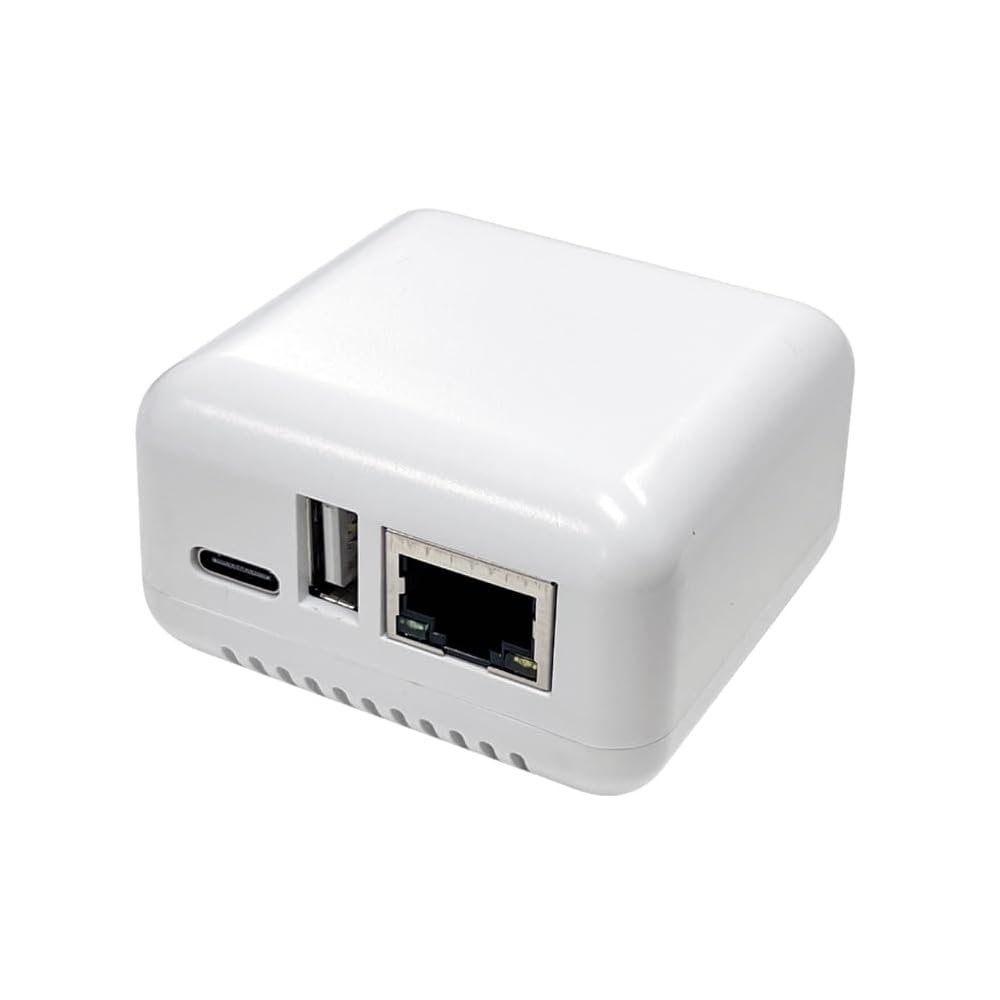
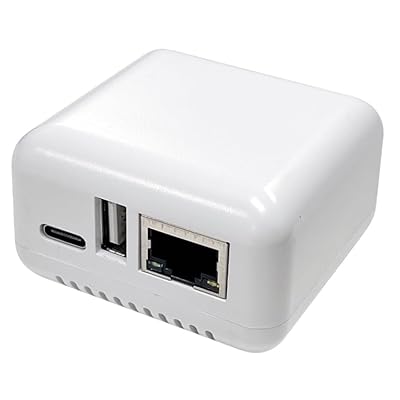
Dual-Mode USB Print Server for Sharing USB Printer Through LAN Local Network
Numéro d'article:
30908820
XOF 47801
Price Details
Excluding Shipping & Custom charges ( Shipping and custom charges will be calculated on checkout )
*All items will import from États-Unis
0 ratings
Écrire un commentaire
En stock
 Importé depuis la boutique USA
QTY:
Commandez maintenant et recevez votre commande aux alentours du Samedi, Juillet 04
Transaction sécurisée
Ubuy s'engage à protéger votre sécurité et votre confidentialité. Notre système avancé de sécurité des paiements garantit la confidentialité en chiffrant vos informations lors de la transmission grâce aux protocoles AES (Advanced Encryption Standards) et SSL (Secure Socket Layer). Vos coordonnées de paiement sont 100 % sécurisées car nous ne partageons pas vos informations de paiement avec des vendeurs tiers.
nos meilleurs partenaires logistiques


Premium printer to network adapter for all USB printer use. Any computer on the network can access and control the networked USB printer directly.

Livraison
rapide

Retour
gratuit*

Emballage sécurisé

Produits 100 % originaux

Conformité PCI DSS

Certifié ISO 27001


Note: Step Down Voltage Transformer required for using electronics products of États-Unis store (110-120). Recommended power converters Acheter maintenant.


Ce qui se démarque
Dual-Mode Functionality
Seamlessly switch between USB direct connection and LAN sharing, ensuring flexibility in how you connect your printer across various devices and networks.
Easy Setup
User-friendly installation with minimal configuration required, allowing you to quickly integrate the print server into your existing network without technical hassle.
Cross-Platform Compatibility
Supports multiple operating systems to ensure reliable printing from PCs, laptops, and mobile devices, making it ideal for diverse office or home environments.
Détails du produit
- Converts any USB printer into a shared wireless/wired network printer
- Allows all computers on the network to access and control the USB printer directly
- Enables flexible placement of the printer within Wi-Fi range, reducing cable mess
- Easy setup and Wi-Fi configuration for seamless network integration
- Compatible with various Windows and Mac OS versions
- Supports all types of printers including laser, thermal, and barcode printers
| Printer Type | Laser, Thermal |
| Other Special Features of the Product | Network-Ready |
| Printer Output Type | Monochrome |
| Item Weight | 4 Ounces (113.4 grams) |
| Print media | Labels |
| Compatible Devices | PC, Smartphones, Tablets |
| Additional Printer Functions | Print Only |
| Control Method | Remote |
| Maximum Media Size | A3 |
| Maximum Print Resolution Black and White | 600 dpi |
| Is Electric | Yes |
| Dual-sided printing | No |
| Duplex | simplex |
| Brand | AllAboutAdapters |
| Model Name | W-USB-PS12 |
| Model Number | W-USB-PS12 |
| Built-In Media | Ethernet Cable |
| Model Series | USB Print Server |
| Specific Uses For Product | Gaming |
| Manufacturer | AllAboutAdapters |
| Unit Count | 1 Count |
| Printer Connectivity Type | USB, Wi-Fi |
| Hardware Interface | USB |
| Total Usb Ports | 1 |
| Connectivity Technology | USB, Wi-Fi |
| Printing Technology | Laser, Thermal |
| Special Feature | Network-Ready |
| Printer Output | Monochrome |
| Included Components | Ethernet Cable |
À qui est-ce destiné ?

-
Home Office Users
Ideal for remote workers needing to share a single printer across multiple devices on a home network.
-
Small Businesses
Useful for small teams requiring multiple devices to access a single printer without constant physical connections.
-
Tech Enthusiasts
Great for users who enjoy experimenting with network devices and streamlining their home or office network setup.

-
Large Corporations
Not suitable for large businesses requiring extensive and reliable printing infrastructure; scalability may be limited.
-
Non-Tech Savvy Users
May be complex for users unfamiliar with networking, requiring technical knowledge to set up and manage.
-
High-Volume Printing
Not efficient for high-volume printing needs, as performance may lag compared to dedicated commercial print servers.
DESCRIPTION DU PRODUIT
About This Item
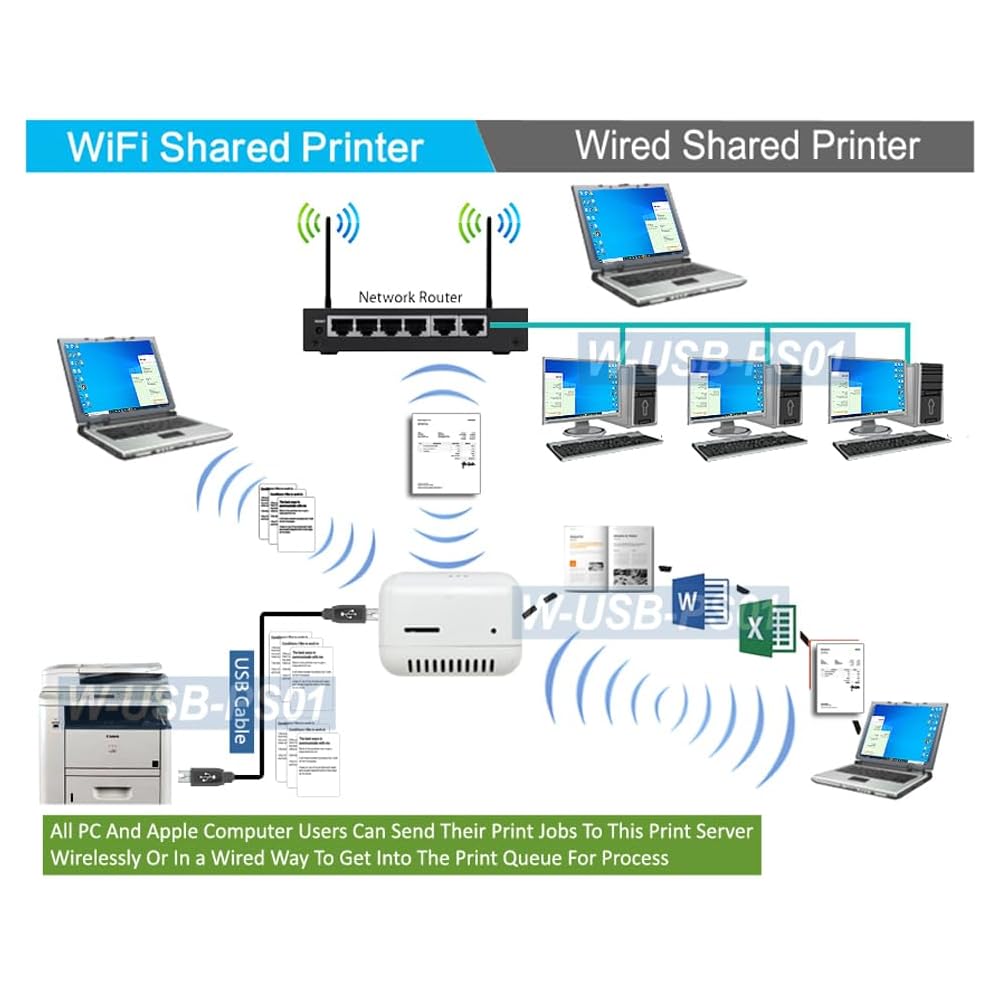
Introducing the Dual Wired and Wireless USB Print Server: Your Solution for Easy Printer Sharing Are you tired of having multiple printers for each computer in your home or office? Say goodbye to the hassle and expense with our premium Dual Wired and Wireless USB Print Server. This innovative device allows you to transform any USB printer into a wireless printer, making it accessible for all users through a wired or Wi-Fi network. Save Money and Simplify Your Setup With this USB print server, you can save money and eliminate the need for multiple printers. By connecting your USB printer to this device, all computers on your local network or Wi-Fi network can access and print to it.
This means less cable mess and more space in your workspace. Place Your Printer Anywhere Thanks to the Wi-Fi functionality of this print server, you can place your printer anywhere within the range of your Wi-Fi network. No more worries about the proximity of your printer to each computer. Whether you want to keep it in a central location or tuck it away in a separate room, the choice is yours. Easy Setup and Configuration Setting up this print server is a breeze.
Simply connect the USB server box to your wired or wireless router and provide power. Then, follow the easy steps to add a network printer on each computer. By installing the printer driver on each networked computer, you can gain access to the printer connected via the print server. Compatibility with All Printers and Operating Systems Our USB print server is fully compatible with all printers, including laser printers, thermal label printers, barcode printers, and more.
It also supports all Windows operating systems, including Windows 10, 8.1/8, 7, XP, and Mac OS. No matter what printer you have or what computer you use, our print server has got you covered. Don't Wait, Upgrade Your Printing Experience Today Experience the convenience and cost savings of our Dual Wired and Wireless USB Print Server. Say goodbye to the hassle of multiple printers and hello to seamless printer sharing.
Upgrade your printing experience now and enjoy the freedom of easy and accessible printing for all.
Vous avez une question ? Chattez avec nous
Questions et réponses des clients
-
question:
What is a Dual-Mode USB Print Server?
répondre: A Dual-Mode USB Print Server is a device that allows multiple users on a Local Area Network (LAN) to share a single USB printer efficiently. This device connects to the USB port of the printer and provides network connectivity either through Ethernet or Wi-Fi, enabling seamless printing from multiple computers and devices. For environments such as offices or homes with various users wanting to print from their respective devices, this server eliminates the need for direct USB connections and enhances productivity. -
question:
How does a Dual-Mode USB Print Server work?
répondre: The Dual-Mode USB Print Server works by connecting to a USB printer and then allowing that printer to be accessible over a network. Users can send print jobs to the printer via the network, whether connected through Ethernet or Wi-Fi, without needing to be physically near the printer. This functionality is beneficial in both small and large setups, ensuring that any device on the network can access the printer for convenience and efficiency. -
question:
What are the benefits of using a USB Print Server?
répondre: Using a USB Print Server offers several advantages, such as increased accessibility to a shared printer, reduced clutter by eliminating multiple direct connections, and enhanced flexibility with wireless printing options. Particularly in an office environment, it allows multiple users to access the printing device simultaneously, streamlining workflow and saving users' time as they no longer need to transfer files to a single computer connected to the printer. -
question:
Can I use a Dual-Mode USB Print Server with any printer?
répondre: Most USB printers are compatible with Dual-Mode USB Print Servers, but it's essential to check for specific compatibility with your printer's make and model. Always refer to the print server's documentation for a list of supported devices, as some specialized printers may have limitations. For households or offices that have a variety of printers, ensuring compatibility can help maintain a smooth printing process across all devices. -
question:
What is the difference between wired and wireless print servers?
répondre: Wired print servers connect directly to a printer via Ethernet, providing a stable connection ideal for environments with heavy printing needs. Wireless print servers, on the other hand, connect through Wi-Fi, allowing more flexibility in printer placement within an office or home. Users can choose based on their network setup and preferences—wired servers generally offer faster and more reliable connections, while wireless servers facilitate easier access for a wide array of devices without being tethered to a single point. -
question:
Do I need to install drivers for a Dual-Mode USB Print Server?
répondre: Typically, a Dual-Mode USB Print Server may require driver installation depending on the operating systems used by computers connected to the network. Most modern print servers are designed to support plug-and-play setups with common operating systems, which simplifies the process. If your system does not automatically recognize the print server, check the manufacturer’s website for the latest drivers or documentation to ensure proper installation and connectivity. -
question:
Is my network secure when using a Dual-Mode USB Print Server?
répondre: Most Dual-Mode USB Print Servers come with security features to ensure that your network remains secure. Utilizing WPA2 encryption for wireless connections and offering IP filtering are common ways these devices help protect your data. It's advised to configure your network settings properly to maintain high security levels, especially when handling sensitive documents. Users in business environments should also consider regular updates to firmware for enhanced security. -
question:
How do I set up a Dual-Mode USB Print Server?
répondre: Setting up a Dual-Mode USB Print Server generally involves connecting it to your printer via USB, connecting it to your router or network, and then configuring it through a computer interface or app. Most devices have a user-friendly guide that assists in establishing the connection through either Ethernet or Wi-Fi. Once set up, any device on the same network can send print jobs wirelessly, enhancing convenience and accessibility for all users. -
question:
What types of users benefit from using a Dual-Mode USB Print Server?
répondre: Various users can benefit from a Dual-Mode USB Print Server, especially those in office settings, small businesses, or even families with multiple devices. For example, in an office where multiple employees require access to a common printer, the print server allows them to print from their workstations without needing to be directly connected. Similarly, in a household, family members can print from laptops, tablets, or smartphones without interrupting each other’s activities. -
question:
Where can I buy a Dual-Mode USB Print Server for Sharing USB Printer Through LAN Local Network?
répondre: You can purchase a Dual-Mode USB Print Server for Sharing USB Printer Through LAN Local Network at Ubuy. Ubuy offers a wide range of options with quick access to product details and specifications, allowing you to choose the right server that fits your needs efficiently. Their platform is designed to make online shopping easy, ensuring you can find what you need to enhance your printing capabilities without hassle.
AllAboutAdapters Print Servers W-USB-PS12 Editorial Review
The Dual Wired and Wireless USB Print Server initially worked fine for some customers but soon stopped working. Many users had difficulty setting up the product, finding the instructions incomplete and complex. Some customers also faced challenges connecting it to their Wi-Fi network, with the WPS button not responding as expected. A mention of a phone app install in the booklet did not provide the name of the app. Overall, the mixed reception and initial issues suggest that this product may not be reliable or user-friendly.
Avis et évaluations clients
7 évaluations des clients
-
5 étoile
35%
-
4 étoile
0%
-
3 étoile
0%
-
2 étoile
14%
-
1 étoile
51%
Donnez votre avis sur ce produit
Partagez votre avis avec d'autres clients
Les inconvénients
- Product stopped working for some customers
Historique des prix du produit
Informations importantes
- Limitations : Pour les produits expédiés à l'international, veuillez noter que toute garantie du fabricant peut ne pas être valide ; les options de service du fabricant peuvent ne pas être disponibles ; les manuels, instructions et avertissements de sécurité des produits peuvent ne pas être dans les langues du pays de destination ; les produits (et les matériaux qui les accompagnent) peuvent ne pas être conçus conformément aux normes, spécifications et exigences d'étiquetage du pays de destination ; et les produits peuvent ne pas être conformes à la tension et aux autres normes électriques du pays de destination (nécessitant l'utilisation d'un adaptateur ou d'un convertisseur le cas échéant). Il incombe au destinataire de s'assurer que le produit peut être importé légalement dans le pays de destination. En cas de commande auprès d'Ubuy ou de ses filiales, le destinataire est l'importateur officiel et doit se conformer à toutes les lois et réglementations du pays de destination.
- Tous les produits listés sur Ubuy ne sont pas à vendre, Ubuy étant un moteur de recherche mondial. Les produits sont soumis aux réglementations en matière d'exportation et de commerce.
XOF 47801
Commandez maintenant et recevez votre commande aux alentours du Samedi, Juillet 04
This item is not restrict in my country.(Please click on above link if this item is not restrict in your country, So our team will review and allow.)
QTY:
Transaction sécurisée
Ubuy s'engage à protéger votre sécurité et votre confidentialité. Notre système avancé de sécurité des paiements garantit la confidentialité en chiffrant vos informations lors de la transmission grâce aux protocoles AES (Advanced Encryption Standards) et SSL (Secure Socket Layer). Vos coordonnées de paiement sont 100 % sécurisées car nous ne partageons pas vos informations de paiement avec des vendeurs tiers.
nos meilleurs partenaires logistiques
Livraison transfrontalière la plus rapide
Caractéristiques et avantages
- Easily connect your USB printer to a network and print from any computer on your network.
- No additional printers needed and save money and no need to place the printer right next to the computer.
- LED indication for power, connectivity and USB connection.
- Compatible with the latest Windows OS versions including Win10, Win8.1/8, Wini7, Vista and XP and also Mac OS X.
- Easy Wi-Fi configuration. Users can configure the IP address of this device manually through the Wi-Fi link with a smart phone.